us2us Drive brings Drive and Photos together. Every file is encrypted on your own device; our server can see neither what is inside your files nor what they are called. The first 1 GB is free.
Sign in with your us2usmail.com account · Mac: macOS 12.3 or later, Apple silicon and Intel
Photos
Backing up 3 photosWi-Fi · encrypted on this device40%
YearsMonthsDays
TodayKordon, İzmir
YesterdayUrla
0:42
PhotosAlbumsDriveShared
End-to-end encryption
Locked on your device, and the key stays with you
End-to-end encryption means a file can only be opened on your own devices. Whoever sits in between, us included, sees nothing but a locked box.
Your deviceEncryptsServer and storageSees locked data onlyYour other devicesUnlock
1
Locked on your device
A file’s contents, its name, folder names, and where and when a photo was taken are encrypted on your computer or phone before upload.
2
Stored locked
Only encrypted data reaches our server and storage. Keys never go to the server in the clear.
3
Opens only on your devices
A new device is added with the approval of one you already have, or with your 24-word recovery key. Your account password alone does not open your files.
Your documents and photos live in the same account, with the same protection.
Drive
Organise your folders, upload your files and open them on any of your devices.
Drag-and-drop upload of files and folders, moving and renaming
Older versions are kept for 30 days; go back to any of them
Deleted items wait in the trash for 30 days
Photos
Your photos and videos are sorted by the day they were taken.
The preview opens at once; the original follows
Where, when and with which camera stays encrypted
The same photo is never uploaded twice
Photos
Only you know where a photo was taken
A photo’s location, date and camera are as private as the photo itself. us2us Drive encrypts them too; every detail on your screen is decrypted on your own device.
Location and date encrypted: our server cannot see where or when a photo was taken.
Your device makes the thumbnails: previews and thumbnails are made and encrypted on your device too.
Search on your device: names are encrypted, so search runs on your device, not on the server.
Showing preview · original downloading 64%
InfoEnd-to-end encrypted
Saturday, 14 November 2026 · 18:42Taken
Kordon, İzmirLocation decrypted on this device; our server cannot see it.
24 mm · ƒ1.78 · 4032 × 3024HEIC · 3.8 MB
Sharing
Still encrypted when you share
When you share a file or a folder, its key goes only to the person you share with. The server knows who you share with; it cannot see what.
With a person: add a us2us user as a viewer or an editor, and remove their access whenever you like.
Safety number: compare the 60 digits, or the QR code, that both of you see. That is how you know the key really belongs to that person.
With a link: someone without an account opens the file in their browser. Add a password, an expiry date and a download limit, and turn the link off at any time.
In a link, the key that opens the file is in the part of the address after the # sign; browsers never send that part to our server.
Share “Holiday 2026”It opens on their device; only they get the key.
DdenizKey verifiedCan edit
AayşeCompare safety numberCan view
Public link
us2usdrive.com/s/7Kq2fX9a#h3Zp…
PasswordUntil 30 November10 downloads
Family
One plan, six people, everyone’s own space
On plans of 200 GB and up you can add your family. Only the family owner pays; the plan’s storage is shared within the family.
The owner and up to 5 people: the person you invite accepts on their own device.
A shared pool: everyone uses the plan’s storage; the owner can set a limit per person.
Family album and Family folder: everyone in the family can add photos and files.
Everyone’s own space stays private: members’ own Drive and photos are theirs alone. The family owner only sees how much storage each person uses.
Plans and prices are on the Pricing page; sales open soon.
Family album6 people
AllMineFamily
Family storage1.2 TB / 2 TB
Family folderEveryone in the family can add
Coming soon · iPhone, iPad and Android
The photos on your phone will back themselves up
The phone apps are coming to the stores soon. They will notice the photos you take, encrypt them on your phone and upload them.
Automatic backup: your photos and videos back up by themselves and pick up where they left off if interrupted.
Free up space: once backed up, originals are deleted from the phone if you approve; thumbnails stay, and a tap brings the original back. On an iPhone with iCloud Photos turned on, this feature does not delete anything.
Your rules: Wi-Fi only or not, videos or not: you choose.
iPhone does not let any app run in the background all the time. Backup moves on while the app is open, while charging, and in the time iOS gives it.
Backup
Wi-Fi only · videos included
IMG_2041.HEICFetching from iCloud
IMG_2040.MOVEncrypting
IMG_2039.HEICBacked up
Free up spaceThe originals of 8,912 backed-up photos can be deleted from this phone. Thumbnails stay.
Free up 12.4 GB
Apps
Choose Drive for your device
Every app uses the same encryption core: one account, the same files.
Mac
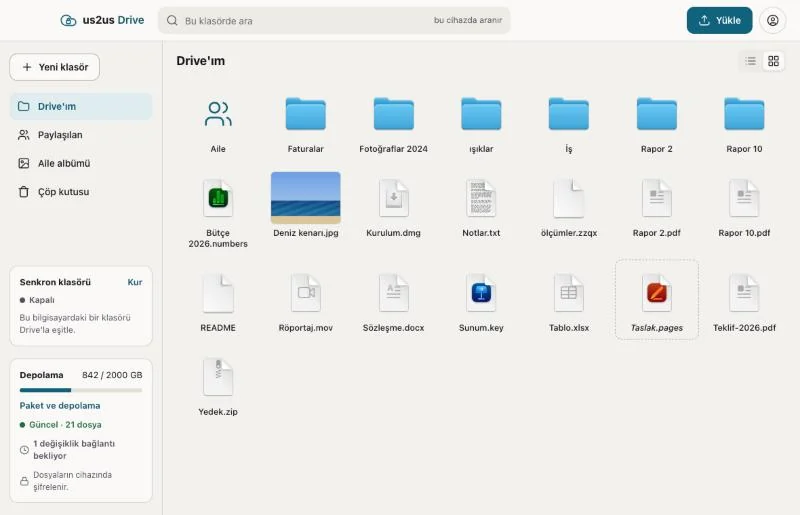
A two-way sync folder. Files show their own icons and open in their own apps.
Download
Web
Nothing to install: app.us2usdrive.com. Drive and Photos in your browser.
Your account is an @us2usmail.com address. If you use us2us Mail, you sign in with the same account; Drive storage is separate from Mail storage.
Files in Frankfurt
Encrypted files are kept in a private store in the Frankfurt (eu-central-1) region of Amazon Web Services. Transfers go through our own domain.
Keep your recovery key
Your first device gives you a 24-word recovery key. If you lose all your devices and these words, your files cannot be recovered; we do not hold the key.
Start with 1 GB free
Download the desktop app or open us2us Drive in your browser, and sign in with your us2usmail.com account. This site does not create accounts, and has no forms or cookies.